
On the Market Summary Report (formerly the Market Scoring Report), you can check a chosen market's indicators and see the trends move from weak to strong (or vice versa), all on one page.
You can get more detail by opening Advanced Mode (and the "?" details on each indicator), and you can view the underlying charts.
The chart you see with the buy/sell signal is actually a chart of the annual APPRECIATION RATE — not a chart of real estate values. So:
- Any time the line is above the 'zero' line, values are increasing.
- Any time the line is below the zero line, values are declining.
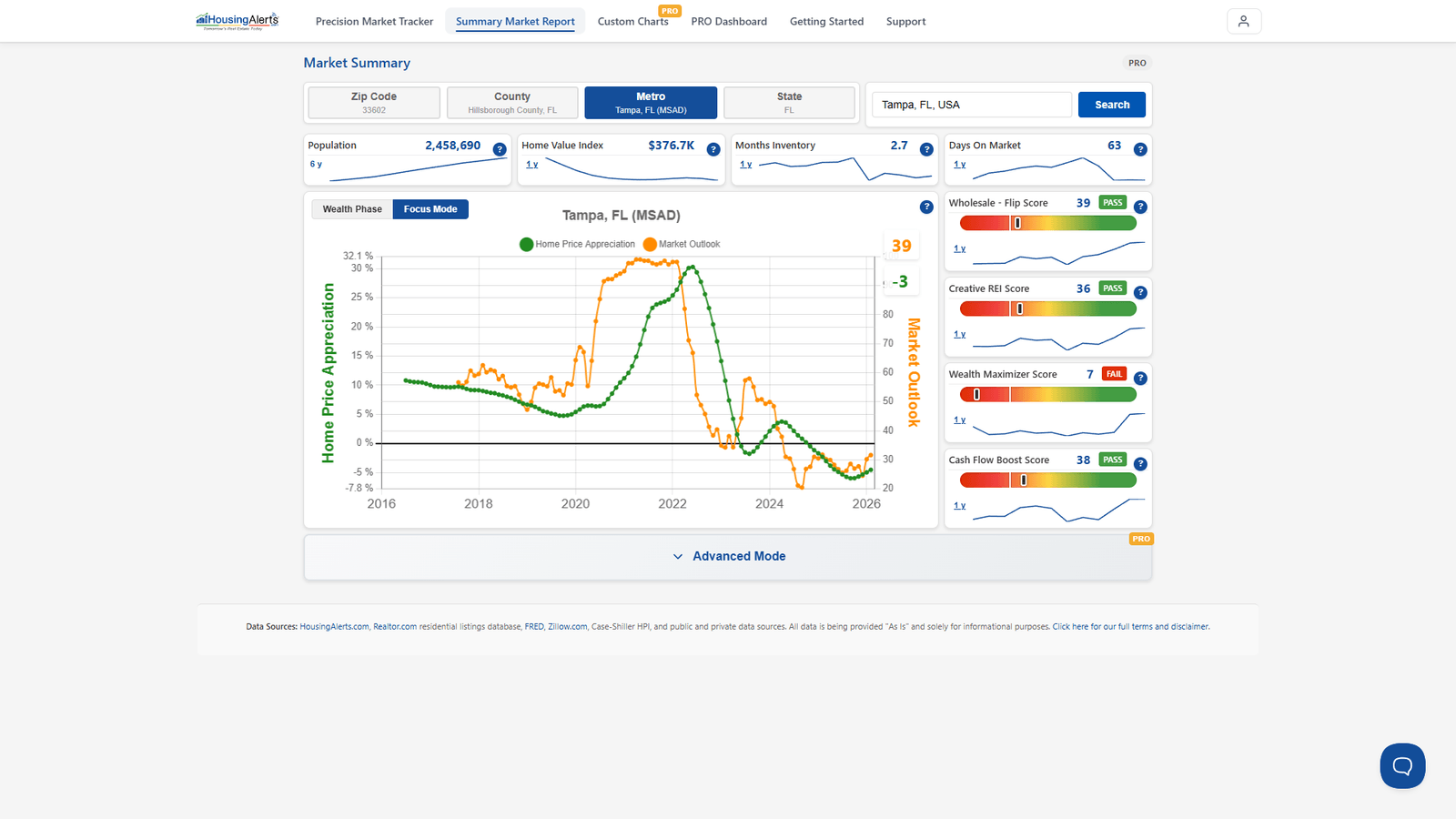
For example, if the line sat perfectly flat at +5% (parallel to the zero line), that would mean values increased 5% each year over the preceding year.
On the new platform, search any Metro, County, or ZIP in the report's search box to pull its full scorecard — the Market Outlook chart and headline tiles up top, the strategy scores (PASS/FAIL) on the right, and the ranking gauges plus S.T.A.R./T.A.P.S. detail in Advanced Mode.